> For the complete documentation index, see [llms.txt](https://fellou.gitbook.io/fellou/llms.txt). Markdown versions of documentation pages are available by appending `.md` to page URLs; this page is available as [Markdown](https://fellou.gitbook.io/fellou/guides/quickstart.md).
# Quickstart
Let’s create an eko workflow together in a browser extension to automate the task that `Search Sam Altman's information and summarize it into markdown format for export`.
> With this plugin, you no longer need to manually open multiple web pages; instead, you can run everything with a single click.
### Prerequisites
1. **Install `npm`**: Make sure you have [Node.js](https://nodejs.org/) installed. You will also need either `npm` or `pnpm` for managing dependencies. If you haven’t installed `pnpm` yet, follow these steps:
2. **Install `pnpm`**
```
npm install -g pnpm
```
> Note: If you prefer using `npm` for the setup, you can skip the pnpm installation and use npm commands instead. However, pnpm is faster and more efficient with handling dependencies.
### Install Eko
Let’s start by creating a new project and installing Eko:
```
# Install the Eko CLI globallypnpm install @eko-ai/eko-cli -g
# Create a new browser extension projecteko-cli init browser-extension-demo
# Install dependenciescd browser-extension-demopnpm install
```
> If npm environment variables are not configured on Windows, the `eko-cli` command may show as non-existent. Alternatively, you can directly clone our provided template project. `git clone https://github.com/FellouAI/eko-browser-extension-template.git`
### Your first workflow
The core logic of workflow is in `src/background/first_workflow.ts` file:
```
import { Eko } from "@eko-ai/eko";import { EkoConfig } from "@eko-ai/eko/types";import { getLLMConfig } from "@eko-ai/eko/extension";
// Task promptconst prompt = `Search Sam Altman's information and summarize it into markdown format for export`;
export async function main() { // Load LLM model configuration // the current browser plugin project provides a page for configuring LLM parameters let config = await getLLMConfig();
// Initialize eko let eko = new Eko(config as EkoConfig);
// Generate a workflow from natural language description const workflow = await eko.generate(prompt);
// Execute the workflow await eko.execute(workflow);}
```
> Click [here](https://github.com/FellouAI/eko-demos/tree/main/browser-extension-quickstart) to view the sample demo code, or directly [download the extension](https://github.com/FellouAI/eko-demos/tree/main/browser-extension-quickstart/dist) to experience the workflow.
3. **Build**: Build the project into browser-loadable extension code:
```
pnpm run build:dev
```
### Load extension
* Open the [Chrome browser](https://www.google.com/chrome/) and navigate to `chrome://extensions/`.
* Turn on `Developer mode` (toggle switch in the top right corner).
* Click `Load unpacked` button (the blue text in the top-left corner) and select the `dist` folder of the project (*e.g.*, `[root_directory]/Eko/browser-extension-demo/dist`).
* For **Chinese** users: If it’s inconvenient to obtain an API key from the OpenAI or Claude platform, consider using mirror sites or services (such as [ZetaTechs API](https://api.zetatechs.com/)), and then replace the *Base URL* and *API key* with the corresponding values.
### Configure LLM model API Key
* Click the `Details` button on the `eko agent` card.
* Scroll down to find the `Extension options` section.
* Open it and enter your LLM model API Key.
### Let’s run it!
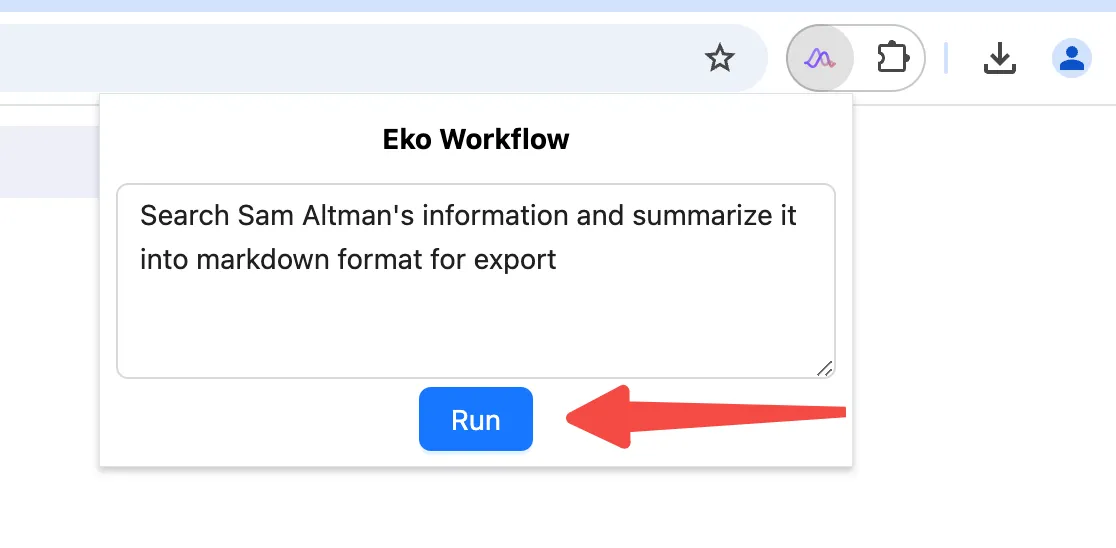
Pin the current extension in the browser’s top-right extensions menu, click the extension to open the popup, input task prompt, and click the RUN button to execute.Run your workflow by clicking the RUN button in the extension popup.